
How to Link Your HoYoverse Email Account (Genshin, HSR & ZZZ)

If you play Genshin Impact, Honkai: Star Rail or Zenless Zone Zero with a Google, Apple, Facebook or Guest login, this guide shows how to link an email and set a password on your HoYoverse Account, on the website or in the game, so you can sign in on any device and use a login top-up.

All-In-One Bundle
$162.8
$200.94-$38.14Blessing of the Welkin Moon
$4.04
$4.99-$0.9560 Genesis Crystals
$0.81
$0.99-$0.18300+30 Genesis Crystals
$3.82
$4.99-$1.17
Quick answer
Sign in at account.hoyoverse.com (or open Settings → Account → User Center in the game), go to the Email section, tap Link, enter your email and the verification code, then set a password. It works the same for Genshin Impact, Honkai: Star Rail and Zenless Zone Zero, and once it's done you can sign in with email and password on any device.
If your game account was created with Google, Facebook, Apple, Game Center or Guest Mode, link it to a HoYoverse email account as soon as you can. It gives you a dependable way to sign in when you switch phones, reinstall the game or run into trouble with a third-party login.
01Why Should You Link a HoYoverse Email Account?
Usually stored only on your current device. Change phones, reinstall, clear app data or lose the device, and an unlinked Guest account may be hard or impossible to recover.
A linked email gives you a second way in. If a third-party login stops working, loses authorization or misbehaves on a new device, you can still sign in through your HoYoverse Account.
One login that works across supported devices and platforms, and the login method that login top-ups require.
02Method 1: Link Your Email on the HoYoverse Website
This works for Genshin Impact, Honkai: Star Rail and Zenless Zone Zero, and it's the easiest option if you prefer doing it in a browser.
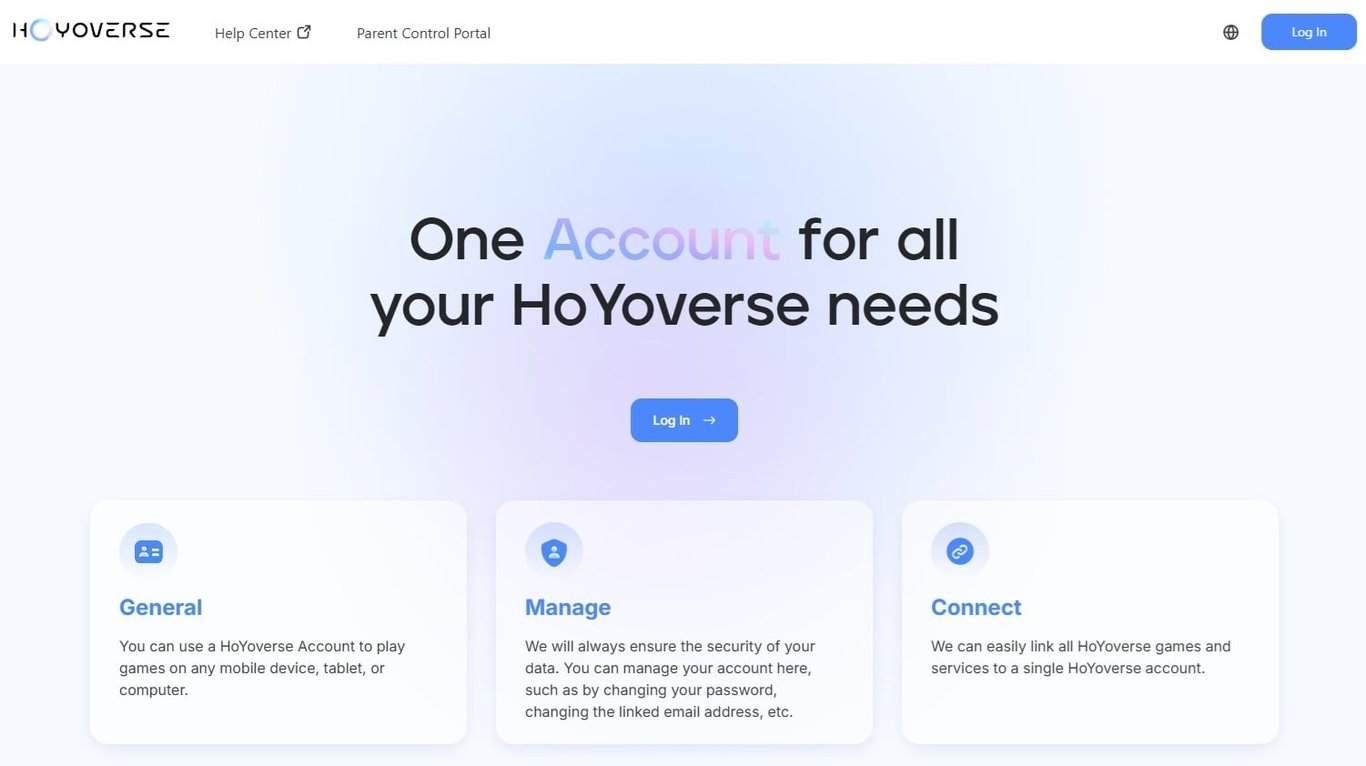
Sign in
Open account.hoyoverse.com and sign in the same way you sign in to the game, for example with Google or Apple.
Open Personal Information
Go to the Personal Information page.
Link your email
Find the Email section, click Link, enter the email address you want to use and request a verification code.
Verify and set a password
Enter the code and follow the prompts to set your account password. From now on you can sign in with that email and password.
03Method 2: Link Your Email Through the In-Game User Center
You can also do it without leaving the game. Open the User Center from these menus:
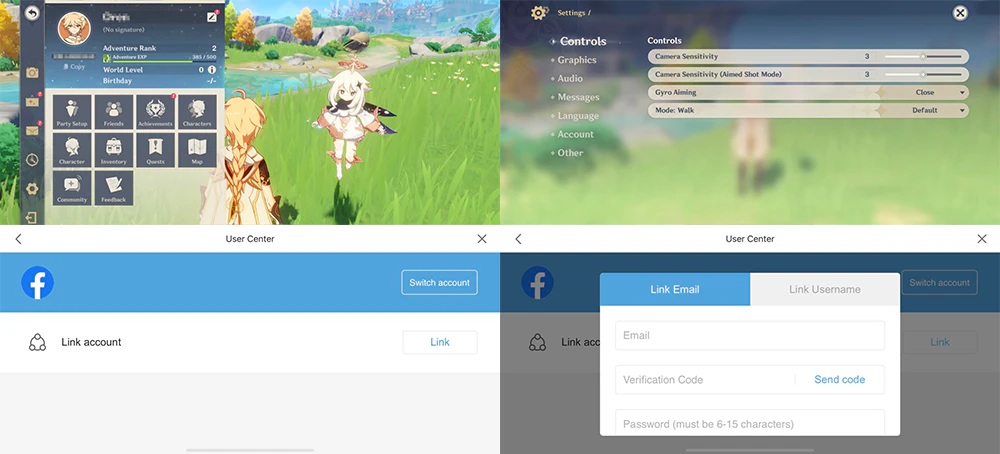
Genshin Impact
Paimon Menu → Settings → Account → User Center
Honkai: Star Rail / Zenless Zone Zero
Menu → Settings → Account → User Center
In the User Center, find the Email section, tap Link, then enter your email address, the verification code and a new password.
04Using Your Account for a Login Top-Up
A login top-up buys Genesis Crystals, Oneiric Shards or Polychromes straight from the shop on your own account, usually for less than the in-game price. To do that, the service needs an email-and-password login, so players who only sign in with Google, Apple or as a guest have to link an email and set a password first, exactly as above.
- Have three things ready: your HoYoverse Account email, its password, and your server and UID.
- Console players: use the HoYoverse Account linked to your PlayStation or other platform account, and set its email and password the same way.
- Keep your inbox open while the order runs. HoYoverse may email a verification code when the account signs in from a new device.
- Change your password once the order is complete.
Once your account is ready, you can order a Genshin Impact, Honkai: Star Rail or Zenless Zone Zero login top-up on KeyGold.
05Important Notes
Use an email you'll keep
Changing a linked email can be restricted, so pick a secure address you own and will be able to access long term.
One email, one account
An email can usually be tied to only one HoYoverse Account. If it says the email is already in use, use another one or check whether it's already linked to your original account.
Link Guest accounts first
Guest accounts are much harder to recover after a device loss, reinstall or data wipe, and sometimes can't be recovered at all.
Protect your login
Keep your email, password and verification codes private. Only enter them on a top-up service's order page when you are placing an order there, and change your password afterwards.
Whether you play Genshin Impact, Honkai: Star Rail or Zenless Zone Zero, linking an email is the single most useful step for protecting your account, especially if you rely on a third-party login or Guest Mode.